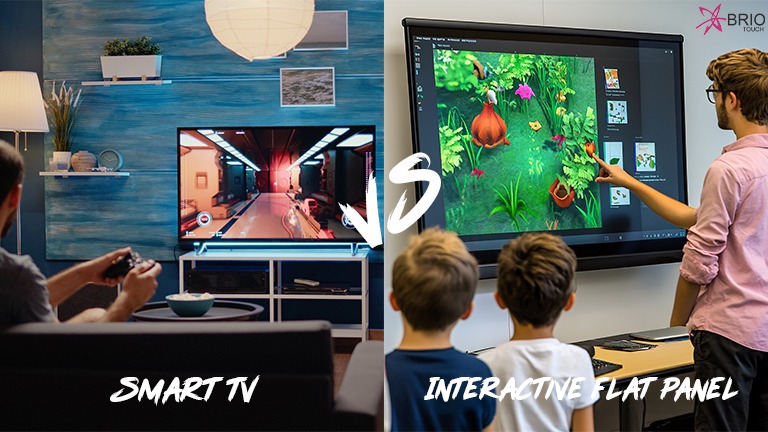

Teachers today are expected to make lessons more interesting, but doing that with old teaching tools is not always easy. Students understand better when they can see visuals, videos, and live explanations on screen, which is why schools are looking for the best interactive displays for education. The challenge is that many interactive panels are either too complicated or not strong enough for everyday classroom use. Schools need something simple, reliable, and made for teaching. Briotouch Interactive Flat Panel is created with classroom needs in mind, and that is why it is often counted among the best interactive displays for education today. In this blog, we will understand why interactive displays are important and what makes Briotouch a strong choice for modern classrooms.
Table of Contents
Also Read: How Interactive Displays for Education Improve Student Engagement
What Makes the Best Interactive Displays for Education?
When schools search for the best interactive displays for education, they look for more than just a modern screen. The panel should work smoothly every day in real classrooms where teachers use it for long hours. Good touch response is important so teachers can write without delay. High display quality helps students see clearly from every corner. Built-in teaching software makes lessons easier, while proper connectivity allows quick use of laptops and online content. Durability also matters because classroom devices are used daily.
Important features to look for:
- Smooth touch performance.
- High-resolution display.
- Built-in teaching tools.
- Multiple connectivity options.
- Strong and durable design.
Introduction to Briotouch Interactive Flat Panel
- Made for Real Classrooms – Briotouch Interactive Flat Panel is built for classrooms, training rooms, and institutes where teachers need things to work smoothly every day, not just during demos.
- All-in-One Setup – Instead of using projector, CPU, and board separately, this panel combines everything in one screen, which actually saves a lot of time during classes.
- Simple to Operate – Many schools prefer Briotouch because teachers can use it without much technical training. The menu is clear, and most functions are easy to find.
- Useful Built-in Tools – Writing, annotation, screen sharing, and presentations can be done directly on the panel, so teachers don’t need to connect extra devices again and again.
- Suitable for Daily Use – Because of its strong build and smooth performance, many institutions consider Briotouch one of the best interactive displays for education for modern classrooms.
Features That Make Briotouch One of the Best Interactive Displays for Education
Ultra HD 4K Display Quality
Briotouch interactive flat panels come with a 4K display, and the difference is easy to notice in classrooms. Text looks sharper, colors look brighter, and even small details stay clear. Students sitting at the back can still read properly, which usually becomes a problem with normal screens, especially in bigger rooms.
Smooth Multi-Touch Interaction
The panel supports multi-touch, so teachers can write or draw on the screen without that annoying delay some panels have. It feels quite close to writing on a whiteboard. Students can also come forward and interact with the screen, which actually makes the class a bit more active and less dull.
Built-in Teaching Software
Briotouch panels already come with built-in teaching tools like whiteboard, annotation, and screen sharing, so teachers don’t have to install different software every time. Notes can be written directly on the screen, topics can be highlighted, and lessons can even be saved for later use. In daily classes, this actually saves a lot of time because everything runs from the same screen and there is less setup before starting the lesson.
All-in-One Smart Classroom Solution
In many classrooms, teachers still have to use projector, CPU, and board separately, which takes time to manage. Briotouch works as a complete smart classroom display, so everything is in one place. Teachers can switch between writing, showing videos, or opening files without changing devices again and again, which makes the class run more smoothly, especially on busy school days.
Easy Connectivity and App Support
Briotouch panels support USB, HDMI, Wi-Fi, and laptop connection, which makes it easier for teachers to use different types of content during class. Presentations, videos, or online material can be opened quickly without doing too much setup. Some models also allow Android and Google apps, which helps in smart classrooms where teachers sometimes need internet or online tools during the lesson.
Strong and Durable for Daily Use
In schools, equipment is used almost the whole day, so durability becomes very important. Briotouch panels are made for regular classroom use and can run for long hours without creating problems. Because of this reliability, many schools prefer it for long-term use and consider it one of the best interactive displays for education for everyday teaching.
Benefits of Using Briotouch Interactive Display in Schools
- Makes Classes More Engaging – When teachers use visuals, videos, and live writing on the screen, students usually stay more focused. It becomes easier to explain diagrams and examples, and the class feels more active compared to normal board teaching.
- Comfortable for Teachers to Use – Everything works from one screen, so teachers can write, show slides, or open files without moving between different devices again and again. This makes daily teaching a bit less tiring.
- Less Time Wasted in Setup – In many classrooms, time goes in arranging projector or connecting wires. With Briotouch, the class can start quickly because most things are already built into the panel.
- Lower Maintenance in Long Run – Projectors often need lamp change or adjustment, but interactive panels usually don’t need that much maintenance, which is why schools prefer them for regular use.
- Useful for Digital and Online Teaching – It supports presentations, videos, and online content, so it works well for both normal classes and hybrid learning. Because of this, many schools see it as one of the best interactive displays for education today.
Conclusion
Modern classrooms need technology that actually makes teaching easier, not more complicated. Schools today are moving toward smart learning, and choosing the best interactive displays for education has become an important decision. A good interactive panel should be clear, responsive, durable, and simple for teachers to use every day. Briotouch Interactive Flat Panel fits these needs by offering strong performance, useful teaching tools, and reliable design for real classroom conditions. Instead of managing multiple devices, teachers can handle everything from one screen. Because of this balance of quality and practicality, many institutions consider Briotouch one of the best interactive displays for education for modern schools.
Upgrade your classroom with Briotouch Interactive Flat Panel and make teaching easier, smarter, and more engaging. Choose one of the best interactive displays for education and bring smart learning to your school today.